VEMVisa | Australian Visa Online Services
A practical guide to creating and securing an ImmiAccount, lodging an Australian visa application, uploading documents and managing the application after submission.
ImmiAccount Australia is the Department of Home Affairs online service used for many Australian visa and citizenship applications. It can be used to start or continue an application, attach documents, make an online payment, receive messages and update information after lodgement.
This guide explains the official ImmiAccount login, how to create an individual account, how to organise an online application and what to do when you cannot access the account. It is a practical navigation guide. It does not replace the eligibility rules and document instructions on the relevant Home Affairs visa page.
Reviewed 17 July 2026: ImmiAccount screens, security steps and online services can change. Always enter your username, password and authentication code only on the official Australian Government portal at online.immi.gov.au. VEM Visa will never need your password or MFA code to explain a visa pathway.
Create an account
Choose individual access for yourself, a family member or a friend you are helping.
Create ImmiAccount
Check an existing visa
Use VEVO for the current visa in effect and its conditions, not as a substitute for application tracking.
Open VEVO
A safer ImmiAccount workflow
01 · Verify
Confirm the visa page and the official portal before entering personal details.
02 · Prepare
Use the application prompts to build an accurate, clearly named evidence set.
03 · Submit
Review answers, make the required payment and retain the submission record.
04 · Monitor
Check messages, respond to requests and update important changes promptly.
What is ImmiAccount Australia?
ImmiAccount is an Australian Government online service. It is not a visa subclass, and it does not decide whether you qualify for a visa. It is the portal used to access many online immigration and citizenship services.

Home Affairs states that ImmiAccount can be used to start a new application, continue a saved application, import or share an application and manage selected actions after it has been lodged. The exact form, questions and document prompts depend on the application type. [Home Affairs: apply and manage an application]
| Online service |
Main purpose |
Use it for |
| ImmiAccount |
Application portal |
Preparing, lodging and managing many visa or citizenship applications. |
| VEVO |
Visa entitlement check |
Checking the current visa in effect, its expiry information and conditions. |
| AustralianETA app |
ETA application channel |
Eligible Electronic Travel Authority applications. Home Affairs says not to use ImmiAccount to apply for an ETA. |
| Australian Immi App |
Identity information |
Only where an eligible applicant receives a request to provide personal identifiers through the app. |
Important distinction: ImmiAccount may show the status and correspondence for an application. VEVO shows details about a visa that is currently in effect. A pending application and a current visa are not the same thing. Read VEM’s guide to checking visa status in Australia for the practical differences.
ImmiAccount login and Multi-factor Authentication
The official ImmiAccount login process uses a username, password and a six-digit authentication code. Home Affairs requires Multi-factor Authentication, commonly called MFA, to add a second security check.
Step 1. Confirm the website address
Open the portal from the Department of Home Affairs website or use the official address beginning with https://online.immi.gov.au/.
Step 2. Enter your username and password
Use the credentials created for your own ImmiAccount. Do not reuse a password shared with email, banking or social-media accounts.
Step 3. Complete the six-digit MFA check
Enter the current code from the authenticator app or the code sent to the verified email address, depending on the MFA option set for the account.
Step 4. Review the account dashboard
Check the correct application and applicant before opening messages, updating details, attaching files or making a payment.
Authenticator app
Home Affairs supports an authenticator app that generates a time-sensitive code. The Department does not have its own authenticator app. Follow the on-screen QR-code or shared-key setup instructions.
Email authentication
An email code is available as another MFA option. Home Affairs warns that email authentication is less secure than an authenticator app and can be affected by email routing or security settings.
For the current setup and recovery instructions, use the official MFA guide and the ImmiAccount access guide.

How to create an ImmiAccount
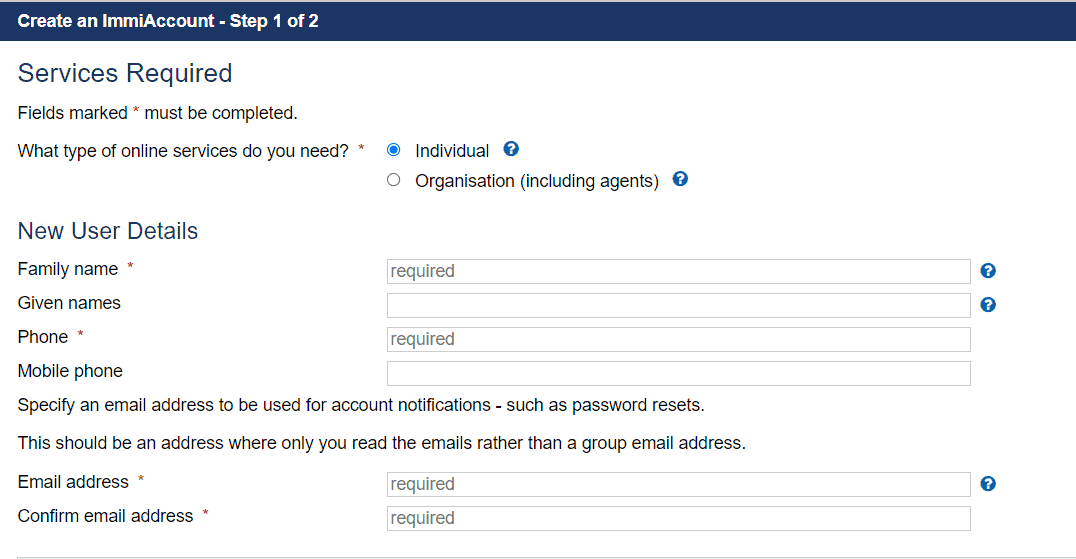
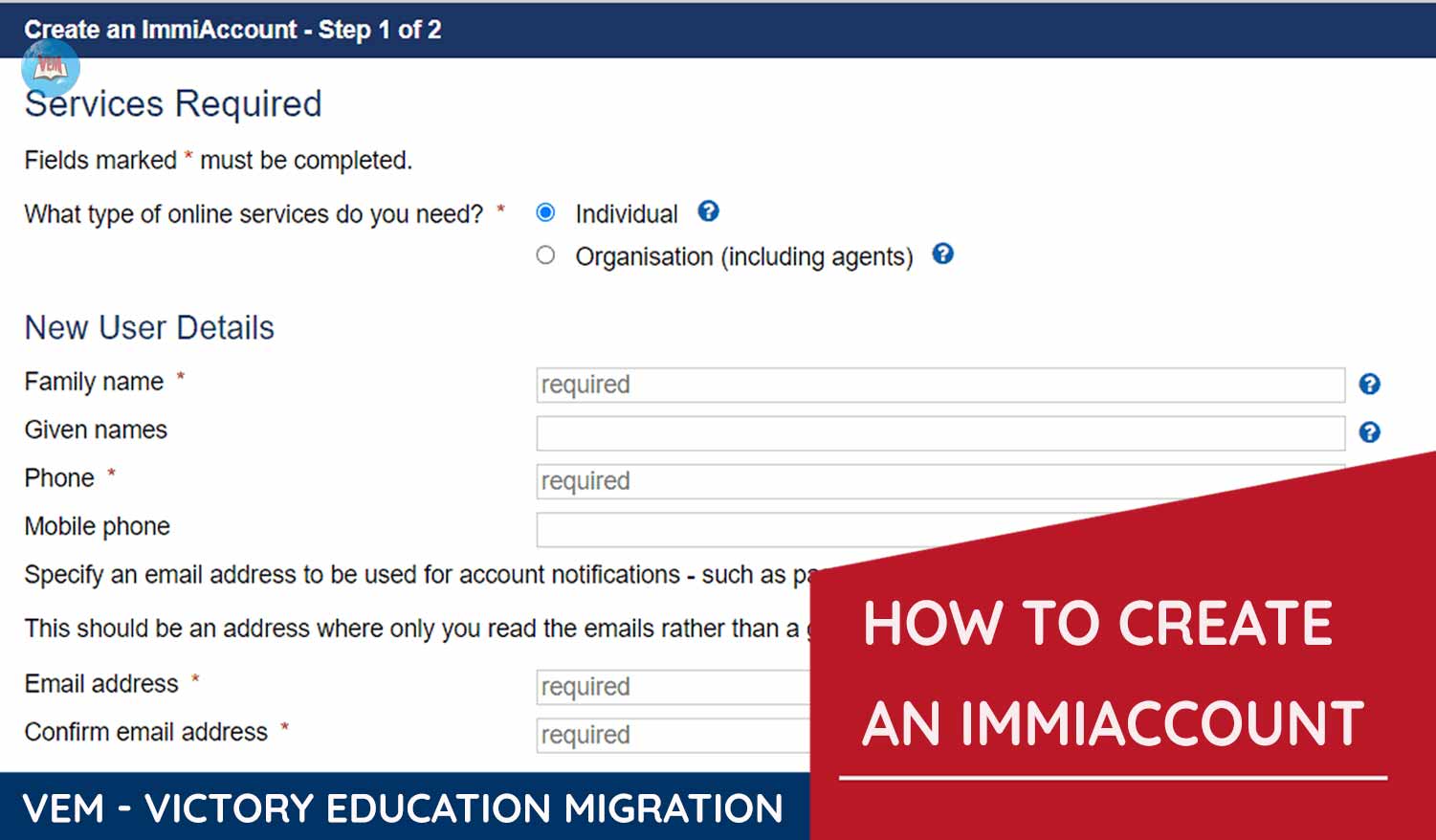
Home Affairs provides individual and organisation access. Most visa applicants create an individual ImmiAccount. Individual access can also be used by a family member or friend helping with the application process. Organisation access is designed for organisations, registered migration agents and sponsoring companies.
| Account type |
Designed for |
Planning point |
| Individual |
An applicant, family member or friend helping with the process. |
Use an email address you control and expect to keep throughout the application. |
| Organisation |
An organisation, registered migration agent or sponsoring company. |
Access and administrator roles should be managed by the organisation, not shared informally. |
1. Open the official registration page
Select individual or organisation access based on who will own and manage the account.
2. Verify the email address
Use an email account that you can access reliably. Check spelling before requesting or entering a verification code.
3. Enter user and account details
Use accurate personal details, create a strong password and record the username securely. Choose secret questions and answers that you can recover without making them easy for another person to guess.
4. Set up MFA
Complete the authentication setup and test a fresh login before beginning a time-sensitive application.
5. Save recovery information securely
Keep the username, registered email and recovery information in a secure password manager or protected record. Do not store the password and MFA secret in an unprotected shared file.
Before someone helps you: Decide who should control the account and who should receive Department correspondence. Sharing an application with another ImmiAccount is safer and more transparent than casually sharing passwords. Registered migration agents are encouraged by Home Affairs to share applications with clients.
How to apply for an Australian visa through ImmiAccount
Creating an account is not the same as lodging a valid visa application. First identify the correct visa pathway, then follow the personalised step-by-step instructions on that visa page. ImmiAccount is the application channel, not a substitute for checking the criteria.
Before opening the form
1. Confirm the correct visa subclass, stream and applicant location requirements.
2. Read the eligibility, “Gather your documents” and application steps on the official visa page.
3. Prepare identity records, dates, addresses, travel, employment, family and other history before entering the form.
Inside ImmiAccount
1. Start the correct application and answer each question accurately.
2. Save the application regularly and review the generated document prompts.
3. Check declarations, attach required evidence, pay the displayed charge and retain the receipt and submission record.
Step 1. Select the correct application
Do not choose a form only because its name looks similar. Check the visa subclass, stream, applicant location and whether an invitation, nomination, sponsorship or prior stage is required.
Step 2. Complete consistent answers
Names, passport details, family composition, dates and histories should align with the evidence. Explain genuine differences instead of forcing documents to appear identical.
Step 3. Review the document list
Use the prompts in the application together with the official visa page. A generic checklist can help with planning but cannot predict every document requested for your circumstances.
Step 4. Check payment before submission
Confirm the amount displayed, accepted payment method, available funds and any applicable surcharge. Do not assume an old fee shown in a blog or screenshot is current.
Step 5. Submit and save records
Keep a copy of the completed answers where available, payment receipt, application reference numbers and every supporting file submitted.
For a broad pathway comparison before opening an online form, see VEM’s Australian visa types guide. Application charges and processing times vary by visa and can change, so use the official pricing and processing-time tools before making financial or travel commitments.
How to upload documents to ImmiAccount
The application form tells you what documents to attach and whether they should be uploaded before or after submission. Home Affairs says not to email documents, and you cannot attach files to an application after it has been finalised.
Home Affairs also warns that supporting documents are not available for you to access from ImmiAccount after upload. Keep your own organised copies of every file. [Official document-upload guidance]
| Document task |
Better practice |
Avoid |
| File naming |
Use clear names such as “Passport-Applicant.pdf” or “Employment-Reference-ABC-2024.pdf”. |
Names such as scan001, final-final or photo without context. |
| Multi-page evidence |
Combine related pages in a logical order where the visa instructions permit. |
Uploading every page as an unrelated file or mixing unrelated evidence in one file. |
| Translations |
Follow the visa page’s translation instructions and keep the original and translation easy to match. |
Uploading an unexplained machine translation as the only version. |
| Image quality |
Check every page at readable zoom before attaching it. |
Blurred, cropped, rotated, password-protected or incomplete files. |
| Duplicate evidence |
Upload relevant evidence once under the most appropriate category. |
Repeating the same document in multiple categories only to increase volume. |
Current document-limit guidance: Home Affairs states that most visa and citizenship applications allow up to 60 documents for each person, while Partner visa applications allow up to 100 documents for each person. This is a system limit, not a target. Relevant, organised evidence is better than unnecessary volume.
If you reach the limit: Read the current Home Affairs instructions before using another category or an additional-document form. Do not send cloud-storage links. Home Affairs states that it cannot accept links to web files such as Google Drive or OneDrive through the attachment process.
Using ImmiAccount after you submit an application
After submission, Home Affairs says you can use ImmiAccount to check messages and the application status, update details or withdraw the application. The available actions depend on the application and its stage.
Check messages
Open correspondence carefully and note any requested action, document and response date.
Update details
Update contact, address, email, phone or passport details using the relevant online action where available.
Correct mistakes
Notify Home Affairs about an incorrect answer as soon as possible and provide a clear correction.
Report changes
Tell the Department about material changes such as a birth, marriage, separation, name change or death in the family.
Attach requested evidence
Use “View details” and “Attach documents” where the application remains open for attachments.
Withdraw if necessary
A withdrawal can have legal, status and fee consequences. Review the position before submitting it.
The official “After you apply” guide provides current menu paths for common changes. Your contact details should remain current so you receive correspondence. A new passport should also be linked to the application or visa using the applicable Home Affairs process.
Do not treat a public processing-time estimate as a countdown for your application. Monitor the account for requests, but avoid repeatedly uploading duplicate evidence or making enquiries that do not add relevant information. VEM’s Australia visa processing-times guide explains how to interpret the Department’s estimates.

Sharing, importing and transferring an application
ImmiAccount can support application sharing and importing. These functions can be useful where an applicant, family member, employer or registered migration agent needs appropriate access without sharing the account password.
| Function |
Possible use |
Control point |
| Share |
Allow another ImmiAccount user to view the application and perform available actions. |
Confirm the recipient account and understand what access is being given. |
| Import |
Bring an eligible existing application into an ImmiAccount using required identifying information. |
Use exact application details and do not import an unknown record. |
| Send incomplete application |
Transfer a draft to another account to continue preparation. |
Review ownership, responsibility and unfinished answers before transfer. |
Using a migration professional: An application can be shared without giving away your personal password. Separately confirm who is appointed to provide immigration assistance and who is authorised to receive Department communications. Account access and formal appointment are related but not identical questions.
ImmiAccount login problems and technical support
Use the recovery links on the official login screen when you have forgotten the username or password or no longer have access to the MFA method. Do not create repeated accounts simply because the first login attempt fails.
| Problem |
First action |
Next check |
| Forgotten username |
Use the “forgotten username” link on the official login page. |
Check that the email entered matches the address registered to the account. |
| Forgotten password |
Use the password recovery link rather than guessing repeatedly. |
Review spam filters and confirm access to the registered email account. |
| Lost authenticator access |
Use the “I no longer have access” MFA link on the login screen. |
Be prepared to confirm the account and reset MFA using the official recovery process. |
| MFA code rejected |
Use the current code and enter it without spaces or extra characters. |
Restart or update the authenticator app, or request a new email code where applicable. |
| Attachment or payment error |
Read the common issues and error messages page. |
Check maintenance notices, file rules, browser behaviour and bank security requirements. |
Technical support is not visa advice: The ImmiAccount Technical Support Form is for technical problems with the account or online application. Home Affairs says it is not for visa eligibility, application-status or general enquiries.
Before submitting technical support, read the common issues page. For a genuine unresolved system problem, use the official technical support form.
Common ImmiAccount mistakes to avoid
- Using a non-official login page: Check the domain before entering credentials or MFA codes.
- Creating the wrong application: Confirm the subclass, stream and pathway before completing a long form.
- Letting someone control the only recovery email: Keep direct access to correspondence and account recovery.
- Sharing passwords in email or chat: Use application sharing and formal appointment processes where appropriate.
- Uploading unreadable or duplicate files: Check quality, naming and relevance before attachment.
- Failing to keep copies: Save your answers, evidence, receipts and correspondence outside ImmiAccount.
- Ignoring messages: Read Department correspondence carefully and respond within the stated timeframe.
- Confusing application status with visa conditions: Use ImmiAccount for the application and VEVO for the current visa in effect.
Need help preparing the application behind ImmiAccount?
VEM Visa can help review the proposed visa pathway, evidence plan and application readiness. Technical access to an online account does not by itself establish visa eligibility.
Discuss your visa application
ImmiAccount Australia FAQs
What is ImmiAccount Australia?
ImmiAccount is the Department of Home Affairs online service used for many visa and citizenship applications. It allows eligible users to prepare, submit and manage online applications.
What is the official ImmiAccount login website?
Use the link from the Department of Home Affairs website or the official portal on online.immi.gov.au. Check the address before entering a username, password or MFA code.
Can I create an ImmiAccount for a family member?
Home Affairs says individual access can be created by an individual applicant, a family member acting on behalf of an applicant or a friend helping with the application process. Clearly manage ownership, correspondence and authorisations.
Do I use ImmiAccount to apply for an ETA?
No. Home Affairs says not to use ImmiAccount to apply for an Electronic Travel Authority. Eligible ETA applicants use the AustralianETA channel.
Can I check my visa application status in ImmiAccount?
After lodgement, ImmiAccount can show available application status information and Department messages. Use VEVO separately to check details and conditions of a visa that is currently in effect.
Can I download documents after uploading them?
Home Affairs states that you will not be able to access supporting documents from ImmiAccount after upload. Keep your own copies before attaching them.
What if I forgot my ImmiAccount password or username?
Use the forgotten username or password links on the official login screen. Check that you still have access to the email address registered to the account.
What if I lost access to my MFA app?
Use the “I no longer have access to my multi-factor authentication app” link on the official login page and follow the recovery instructions. Do not give an authentication code to another person.
Does ImmiAccount tell me which visa I qualify for?
No. ImmiAccount is an online service and application channel. Eligibility depends on the current legal criteria for the visa subclass and your circumstances.
Official ImmiAccount references

 VN
VN
 Người
đăng
Người
đăng Ngày
cập nhật:
Ngày
cập nhật: